Get through your to-do list without getting overwhelmed
The To Done Tracker is a free Notion system I built from my own dashboard. It puts your habits, your priorities, every project you have going and a list of what you got done on one page.
Enter your email and I’ll send it over, with a few tips over the next week. You copy it into your own free Notion account, and it’s yours.

What’s inside the tracker
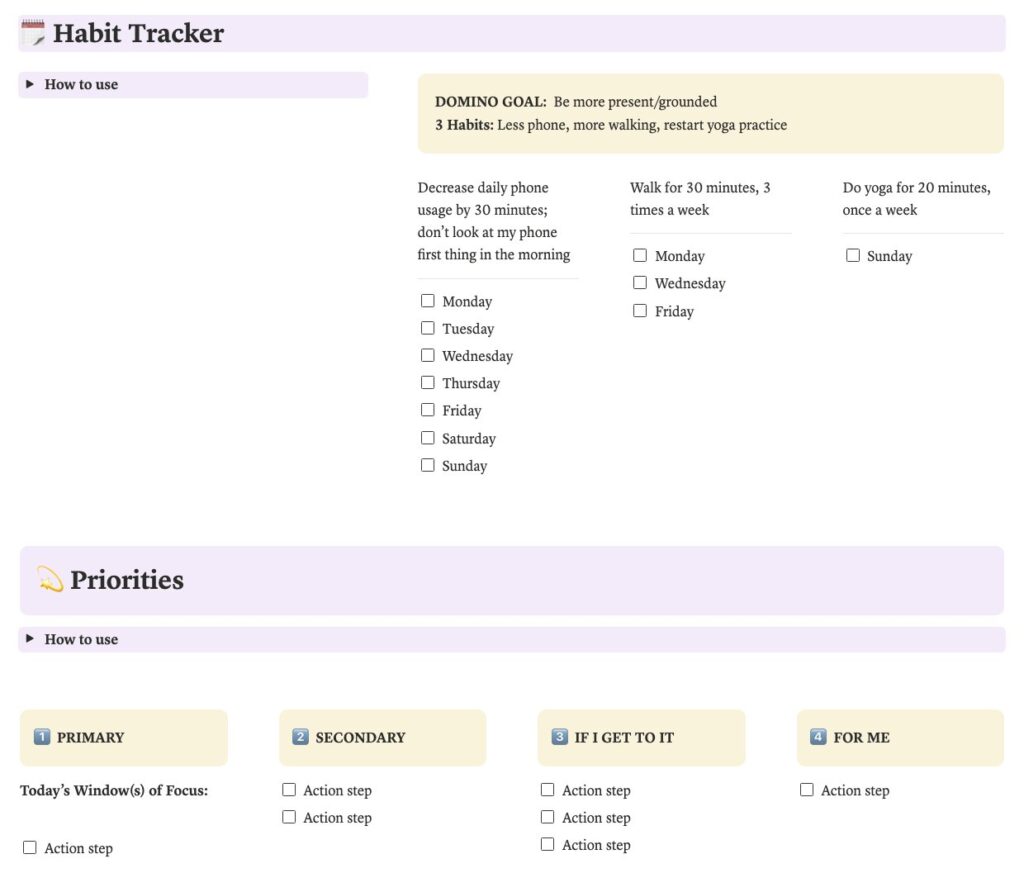
Habit Tracker
Pick your Domino Goal: one thing that, if you did more or less of it consistently, would have a domino effect on your work and your life. Then choose three habits that move it and check them off each week.
Priorities
Each morning, choose seven action steps and sort them into four columns: one Primary, two Secondary, three If I Get To It, and one For Me, a step for your well-being.
Initiatives
A master list of everything you’re working on and the next step for each, plus a SOMEDAY list for ideas and a LIFE STUFF list for errands.
Short-Cuts
The email templates, links, instructions and documents you reach for over and over, in one place.
Reflection
A done list. One thing you’re proud of each day, two each week, three each month and four each quarter.
The case for a done list
A to-do list only shows you what’s left. At the end of a full week, it can look like you did nothing.
In a Harvard Business School study, Teresa Amabile and Steven Kramer analyzed about 12,000 daily diary entries from 238 professionals at seven companies. On people’s best workdays, the most common event by far was making progress on meaningful work.
You’re probably further along than you think. You just haven’t been tracking and celebrating it.
How it works
- Enter your email.
- Confirm it from your inbox.
- Open the tracker and click Duplicate in the top right corner. It copies into your own Notion workspace, where you can change anything. Notion is free.